TextExpander / SaaS ad concept breakdown
A short shortcut.
A visible result.
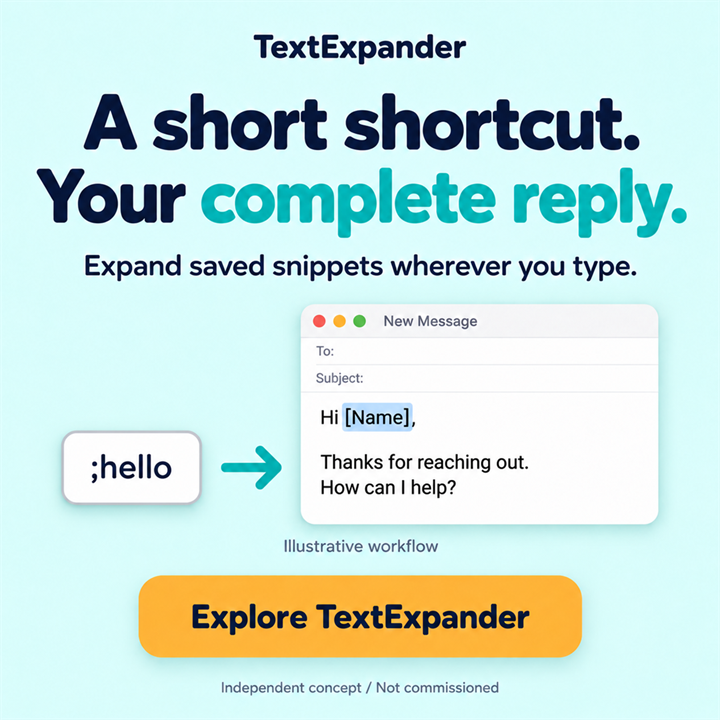
How do you explain text expansion in one static image? This independent TextExpander ad concept puts a short abbreviation next to the saved reply it represents, making the feature visible in a familiar email context.
Independent concept · Not commissioned. AI-assisted visuals. Illustrative workflows, not product screenshots. No campaign results.
- Intended audience
- Support and operations teams
- Message focus
- Expanding saved text with a shortcut
- Work shown
- One square static ad concept · selected v03
THE IDEA IN BRIEF
The concept connects “;hello” to an illustrative email reply with a single arrow. The headline, “A short shortcut. Your complete reply.” describes that same relationship. It shows saved text expanding, without implying that the software writes a new answer or sends it automatically.
01 / THE CREATIVE DECISION
The brief: show the action behind the benefit
Support and operations teams often reuse parts of their replies. For this self-initiated concept, I narrowed the story to one action: entering an abbreviation to insert saved text. A broad productivity promise would leave the viewer to guess how the product helps.
The email example supplies a recognisable setting. It is intentionally short enough to read within the image: a greeting, thanks for reaching out and a question offering help. It illustrates a reusable reply, not a fully resolved customer request.
02 / THE CREATIVE DECISION
Why the copy mirrors the demonstration
“A short shortcut. Your complete reply.” contrasts the small input with the larger output. The supporting line names saved snippets, so the message is about reusing prepared text. The visual and copy describe the same mechanism.
The mint background, dark headline and turquoise emphasis separate the message from the warm yellow call to action. The button says “Explore TextExpander,” offering a next step without adding a trial condition or a quantified time-saving claim.
The phrase “wherever you type” belongs to the original concept copy; it is not a compatibility guarantee for every application or device. Supported environments would need confirmation for a live campaign.
03 / THE CREATIVE DECISION
The revision: bring cause and effect closer
The selected v03 keeps the original concept and moves the “;hello” block and arrow down, closer to the reply text. This makes the connection visually more direct: the arrow points towards the content the shortcut stands for, rather than towards the top of an email window.
The graphic is an illustrative workflow, not a product screenshot. “;hello” and the reply were made for this example, and “[Name]” is a visual placeholder. They do not document a preinstalled template or the product’s exact field syntax.
The distinction also limits the promise. This image demonstrates snippet expansion; it does not depict AI rewriting, a newly generated response or automatic email delivery. The use of AI in producing the artwork is separate from the product action shown.
04 / BEFORE A LIVE CAMPAIGN
What I would check before calling it ready to run
I would first check that a viewer can explain the arrow: a shortcut inserts saved content. If the image instead suggests “AI writes an email,” the message is being misread and should be revised.
Next, I would check the headline, abbreviation and reply at the intended placement size. The small interface labels are secondary; the cause-and-effect relationship must still be clear. A second production check would confirm the supported environment and final claim wording with the advertiser.
The v03 revision was selected for presentation, not because it won an advertising test. There are no campaign results, measured time savings or conversion claims for this concept.
A principle to take into the next brief
For a feature demonstration, place the input and its result close enough to read as one event. Specific copy and a simple example can explain what happens without relying on a broad productivity claim.
Concept development, in-image copy, visual direction and AI-assisted image generation by Dana Fink. The brand is not presented as a client. View this work in the portfolio.